Evidence-backed Windows guide
How to find duplicate photos on Windows
Find exact copies and similar, resized, rotated, or re-encoded photos without treating every visual match as safe to delete.
Run exact-content scanning first, then run a separate similar-image review. Exact copies can be byte-verified; resized, rotated, cropped, edited, or re-encoded photos must remain a human review decision.
Keyword focus: find duplicate photos WindowsSeparate exact copies from similar images
An exact copy has identical bytes. A similar image may show the same scene after resizing, rotation, editing, metadata changes, or a different encoder. Keep those result sets separate.
Use visual distance as a shortlist, not proof
Perceptual hashes help surface likely relationships. They can also group screenshots, flat graphics, bursts, or near-identical compositions that a person would want to keep.
Compare the properties that affect which copy is best
Inspect pixel dimensions, file size, modified time, path, and preview. Prefer the master with the dimensions and metadata you need instead of blindly keeping the largest or newest file.
- Scan exact content
- Clean only verified copies
- Switch to Similar images
- Review rotated and resized candidates
- Keep masters and edited variants intentionally
Preserve the photo library structure
A reference location protects the curated library while still finding copies scattered through Downloads, exports, chat folders, and removable drives.
First-party workflow evidence
Controlled input → mode → expected result → actual result
- Controlled corpus
- The photo fixture combines a byte-identical copy, a metadata-only rewrite, resized and rotated variants, a cropped edit, and visually related but intentionally different frames. Dimensions, byte size, path, and hashes were captured before scanning.
- Mode and parameters
- Run Exact content first. Then open a separate Similar images scan using perceptual evidence. Keep similarity results review-only and compare the side-by-side preview, dimensions, metadata, path, and modification time.
- Expected result
- The byte-identical copy is proven exact. Re-encoded, resized, rotated, cropped, and related frames may be shortlisted, but none becomes an automatic deletion candidate. A reference library remains protected.
- Actual 0.9.0 result
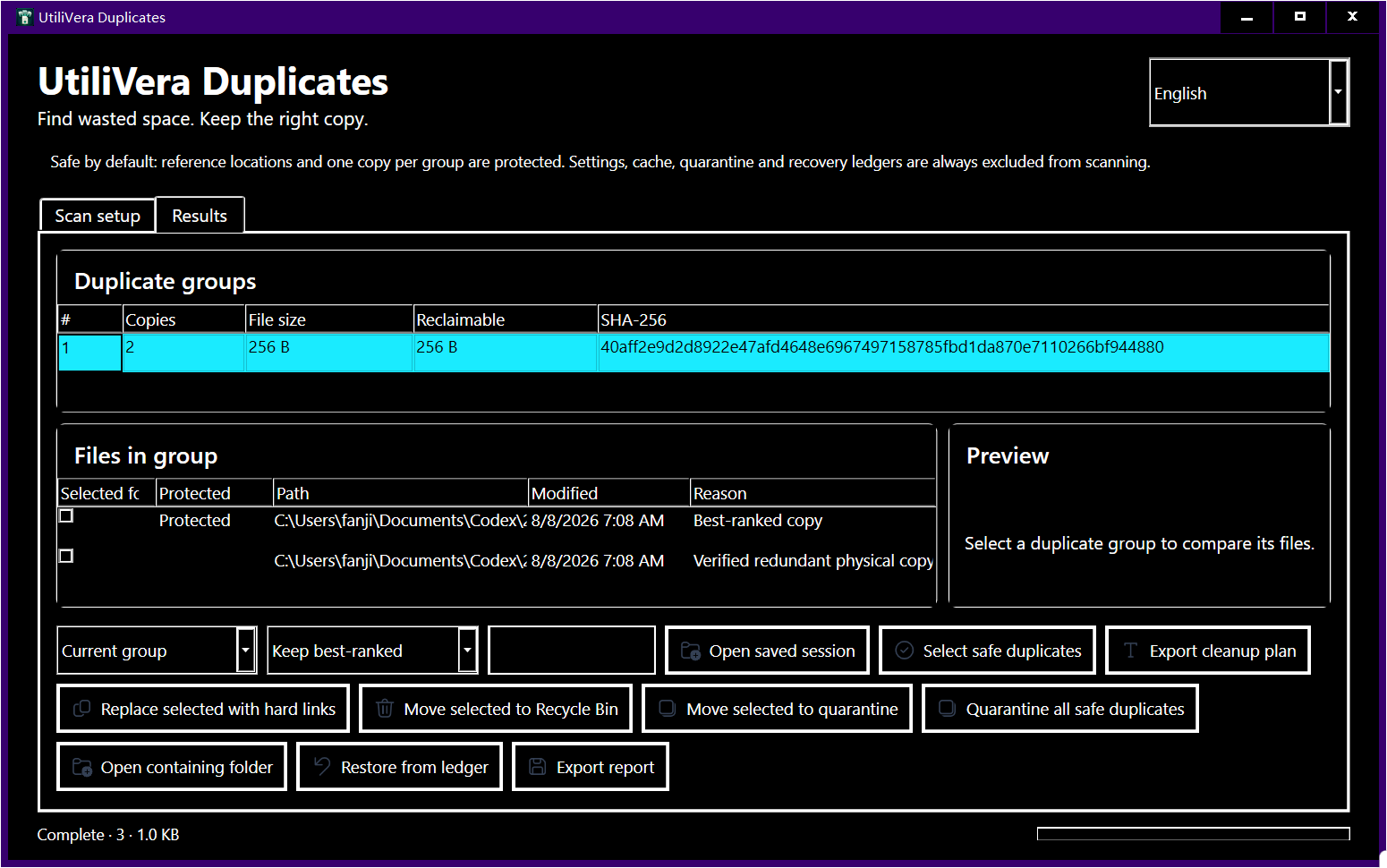
- The exact pass separated byte identity from visual similarity. The review pass surfaced transformed images without promoting them to exact status, and the cleanup planner refused automatic selection for approximate groups. The published high-contrast results capture shows group evidence, the protected copy, preview area, and recovery controls together.
Failure modes and limits
Perceptual distance is not a measure of artistic value. Bursts, scans, screenshots, flat graphics, edited masters, and photographs of the same scene can score closely. Conversely, a crop or large color edit can push related images farther apart.
A scan result can become stale when a file changes after discovery. Revalidate before mutation, close applications that may be writing the files, keep sufficient free space for quarantine or recovery, and treat cloud placeholders as unavailable until they are fully local. A power loss, access-control change, antivirus quarantine, or another process locking a path can interrupt cleanup; the plan and ledger must remain reviewable rather than silently claiming success.
Verify recovery before a large job
Keep the highest-value master and preserve edited deliverables intentionally. Use quarantine for the first cleanup batch, reopen the catalog or DAM, confirm thumbnails and links, then restore any path the catalog expects.
Record the input paths, selected mode, application version, result count, proposed reclaimable bytes, and final hashes. That record turns a one-off cleanup into a repeatable procedure and makes it possible to explain why a file was selected. If expected and actual results differ, stop and preserve the exported report instead of compensating with manual bulk deletion.
Bound to one frozen build
These statements use the 353,792-byte executable with SHA-256 5F59977C69A25CCCB9569D1ED3F4F2D8043E2336CCFCD4C14933A623C754D727. The product audit passed; the current public installer is unsigned.
Frequently asked questions
Can two identical-looking photos have different files?+
Yes. Metadata, compression, dimensions, edits, and container format can differ even when a preview looks the same.
Can similar photos be auto-deleted?+
They should not be. Similarity is evidence for review, not proof that either file is redundant.
Will the photos be uploaded?+
No. UtiliVera Duplicates calculates exact and perceptual evidence locally.
Intent-specific primary sources
This guide combines the frozen product’s public test evidence with the following official or primary technical references. Links were checked August 15, 2026.
Editorial method: claims about UtiliVera are accepted only when tied to the frozen hash and public evidence artifact. Claims about another product are limited to that vendor’s official page. Approximate matches are never described as proof, and the absence of a signed public installer remains visible.
Continue the real workflow
Choose the next UtiliVera tool by task
UtiliVera Duplicates
Verify first. Clean second. Recover when needed.
The unsigned public installer is available now. Review the Windows warning and verify SHA-256 before running it.
View unsigned download details