Disc Studio for WindowsDisc Studio · Windows

Open any disc image. Browse it like a folder. 打开光盘镜像,像文件夹一样浏览。

A free workbench for ISO, BIN/CUE, real optical discs, and USB installers. No ads. No account. Nothing is uploaded. 免费的光盘镜像工作台:打开 ISO / BIN/CUE、浏览实体光盘、转换格式、挂载虚拟盘、刻录或写入启动 U 盘。没有广告,不用注册,文件不会离开这台电脑。

Version 1.0.0 · Setup 79.17 MiB · not code-signed · SHA-256 版本 1.0.0 · 安装包 79.17 MiB · 尚未代码签名 · SHA-256
D25C05290BCC3268924C9614A488D8D3FEB27349A6CEE094A5EC25C0992D3A08
Portable app · 187.34 MiB · SHA-256 绿色版 · 187.34 MiB · SHA-256
63634835D325897327FD578ADA4D4D3C988567975F6EEA8D5EBCF5327BECC4B3

100% free完全免费 No ads, no account无广告,无账号 Files stay on your PC文件只留在本机
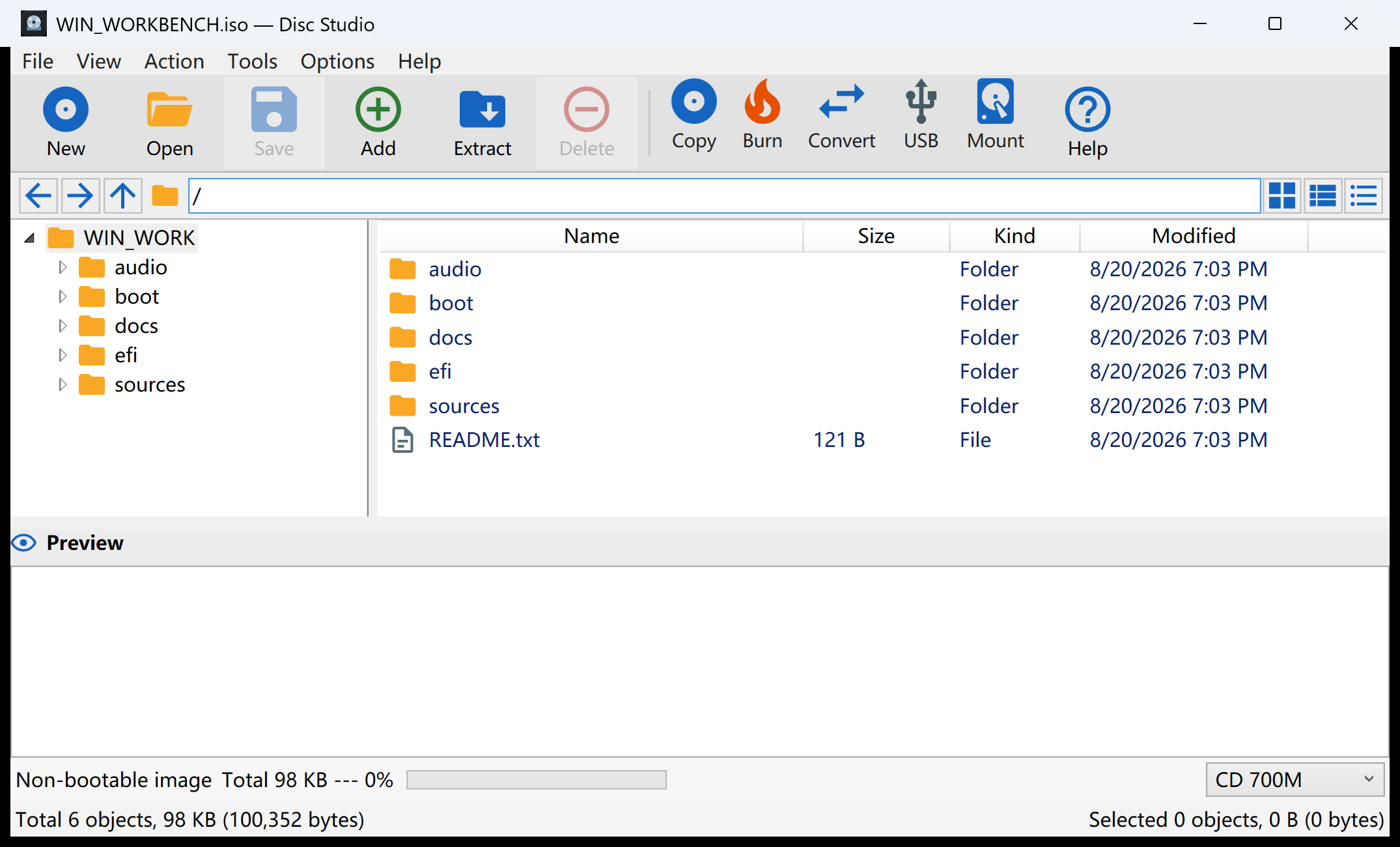
Disc Studio browsing WIN_WORKBENCH.iso
0 ads or paywalls 广告或付费墙
10 interface languages 种界面语言
ISO browse, edit, save 浏览、编辑、保存
BIN/CUE read and write 读取并写出
4 virtual drive slots 个虚拟光驱槽位
0 uploads or trackers 上传或跟踪器

Built for real disc work为真正的光盘工作准备

One window for the jobs that usually need three programs. 一个窗口,做完以前要开三四个软件的事。

Open an image, look inside, extract files, convert the format, mount it, or send it to a disc or USB drive. 打开镜像、查看内容、提取文件、转换格式、挂成虚拟盘,或刻录到光盘、写成启动 U 盘。

Browse images like Explorer像资源管理器一样浏览

Open ISO, BIN/CUE, NRG, MDF, CCD, DMG, WIM, VHD, ZIP, 7z, and more. Add, remove, extract, and save without unpacking the whole file first.
打开 ISO、BIN/CUE、NRG、MDF、CCD、DMG、WIM、VHD、ZIP、7z 等。不用先解压整个文件,就能添加、删除、提取和保存。

Open a real disc immediately放入光盘就能直接浏览

Put a CD or DVD in the drive and browse it at once. If the disc has a filesystem, you see the files. If it is audio-only, you see the tracks.

光盘放进光驱即可打开浏览。有文件系统就看文件;纯音频盘则显示音轨。需要备份时,再复制成 ISO。

Pull audio out of BIN/CUE从 BIN/CUE 抽出音轨

Mixed-mode and audio images expose each track as a WAV or raw BIN file you can extract. Data tracks stay as the original sectors.

混合模式和音频镜像会把每条音轨显示成可提取的 WAV 或原始 BIN。数据轨仍按原始扇区处理。

Convert to the format you need转到你需要的格式

Save as ISO, DSIM, or BIN/CUE in 2048 or 2352 mode. NRG, MDF, and CCD dumps convert to ISO in one step.

另存为 ISO、DSIM,或 2048 / 2352 模式的 BIN/CUE。NRG、MDF、CCD 也可一步转成 ISO。

Mount, then find it in the tray挂载虚拟盘,托盘里能找到

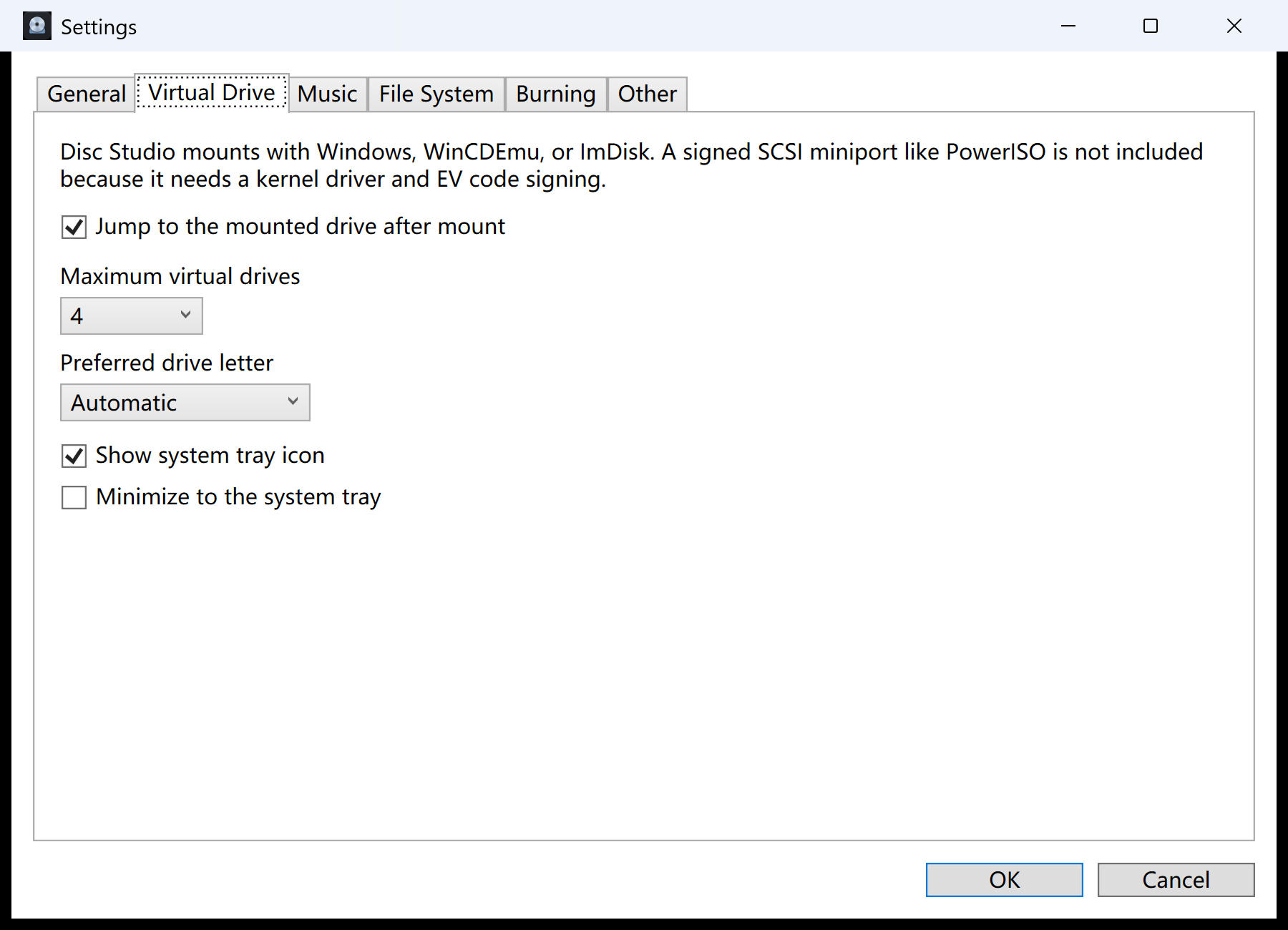
Mount with Windows, WinCDEmu, or ImDisk. Choose up to eight drive slots, a preferred letter, and a tray icon that lists what is mounted.

通过 Windows、WinCDEmu 或 ImDisk 挂载。最多 8 个槽位,可指定盘符,系统托盘会列出已挂载的盘并一键卸载。

Burn, USB, and Windows images刻录、U 盘和 Windows 镜像

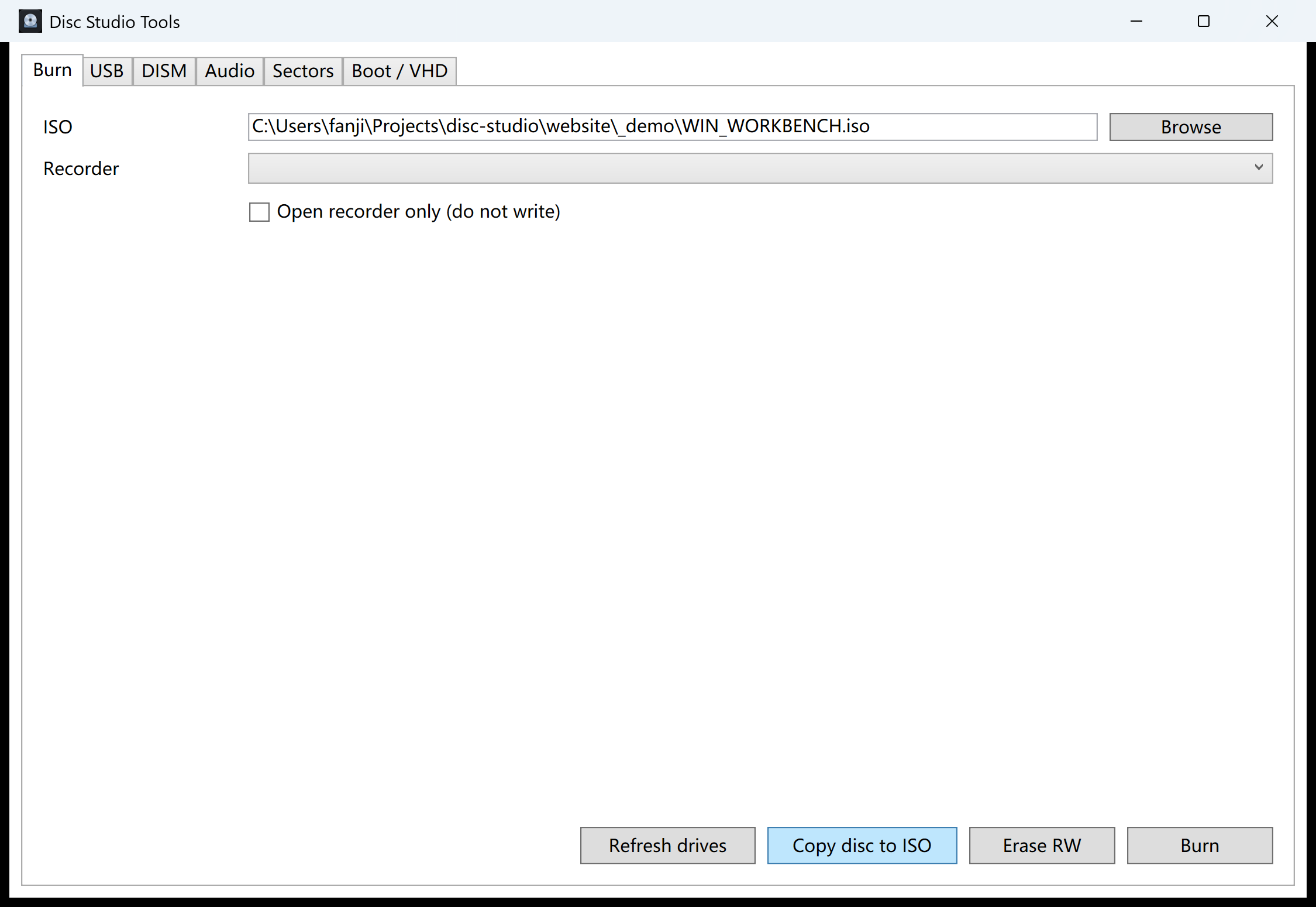
Burn with IMAPI, copy a disc to ISO, write a bootable USB, or use DISM-style tools for WIM/ESD work — all from the same Tools window.

用 IMAPI 刻录、把光盘复制成 ISO、写入启动 U 盘,或处理 WIM/ESD。这些都在同一个工具窗口里。

The real interface真实界面

See the workbench before you download. 下载前先看清楚工作台长什么样。

These screenshots were captured from the Windows build on this page, with a demo ISO open. 这些截图来自本页提供的 Windows 版本,当时打开的是演示 ISO。
Main window browsing an ISO
Open an image and work inside it打开镜像,直接在里面工作 Tree, file list, preview, and a toolbar for add, extract, convert, mount, burn, and USB. 目录树、文件列表、预览,以及添加、提取、转换、挂载、刻录和 U 盘工具栏。
Virtual drive settings
Virtual drives and the tray虚拟光驱和托盘 Pick how many slots you want, a preferred letter, and whether Disc Studio lives in the notification area. 设置虚拟盘数量、首选盘符,以及是否显示托盘图标、最小化到托盘。
Disc Studio Tools burn tab
Burn, USB, DISM, and audio tools刻录、U 盘、DISM 和音频工具 Copy a disc to ISO, erase RW media, write USB installers, and handle WIM/ESD without leaving the app. 复制光盘为 ISO、擦除可擦写盘、写入 U 盘安装器,以及处理 WIM/ESD,都不用离开应用。

A clearer workflow更清楚的步骤

From a folder or a disc to a finished image. 从文件夹或光盘,到做好的镜像。

You do not have to learn a new language. Open something, look at it, then choose extract, convert, mount, or write. 不用先学一套新术语。打开、看一看,然后选择提取、转换、挂载或写入。

  1. 1 Open打开 An ISO, BIN/CUE, archive, virtual disk, or the disc already in your drive. ISO、BIN/CUE、压缩包、虚拟磁盘,或光驱里已经放好的光盘。
  2. 2 Inspect查看 Browse folders, preview files, and extract only what you need. 浏览目录、预览文件,只提取你需要的部分。
  3. 3 Write写出 Save, convert, mount, burn, or create a USB installer. 保存、转换、挂载、刻录,或做成启动 U 盘。

Your files stay here你的文件留在这里
No cloud queue. No hidden upload. 没有云队列,也没有偷偷上传。

Private by design天生就是本地软件

Free. No ads. No account. No upload. 免费、无广告、无账号、不上传。

Disc Studio is a portable Windows app. It does not ask you to register, it does not show banners, and it does not send your images to a server to “process” them. Disc Studio 是绿色便携的 Windows 应用。不用注册,没有横幅广告,也不会把镜像传到服务器上“帮你处理”。

  • Works offline after the first download
  • 下载之后可以完全离线使用
  • Settings live in your Windows profile, not on a website
  • 设置保存在本机用户目录,不在网站上
  • Ten interface languages, including Simplified and Traditional Chinese
  • 十种界面语言,包含简体中文和繁体中文
  • CLI included for repeatable local jobs
  • 附带命令行,方便在本机重复执行同样的任务

Said plainly说清楚

What this build does not pretend to be. 这个版本不会假装自己能做的事。

A useful tool should not advertise another product’s locked formats or a kernel driver it does not ship. 好用的工具不该宣传别人锁定的格式,也不该声称带了自己并没有提供的内核驱动。

  • PowerISO DAA images are not supported.
  • 不支持 PowerISO 的 DAA 镜像。
  • There is no signed SCSI virtual-drive miniport. Mounting uses Windows, WinCDEmu, or ImDisk.
  • 没有带签名的 SCSI 虚拟光驱内核驱动。挂载走 Windows、WinCDEmu 或 ImDisk。
  • True CD-DA burning, VCD authoring, CDDB, and CD-TEXT are not included.
  • 不包含真正的 CD-DA 音轨刻录、VCD 制作、CDDB 和 CD-TEXT。
  • Windows IMAPI cannot incrementally append to a disc that was never finalized.
  • Windows IMAPI 无法对尚未关闭的盘做增量追加。
  • The current download is not Authenticode-signed, so Windows SmartScreen may warn on first run.
  • 当前下载尚未 Authenticode 签名,首次运行时 Windows SmartScreen 可能会提示。

Practical guides实用指南

Solve the job, then download if you need the workbench. 先把事情做完,需要工作台再下载。

Each guide targets one real search: edit an ISO, convert BIN/CUE, mount on Windows 11, write a USB installer, or copy a disc. 每篇指南只解决一个真实搜索:编辑 ISO、转换 BIN/CUE、在 Windows 11 挂载、写启动 U 盘,或复制光盘。

How to edit an ISO on Windows

Add, remove, and save files inside an ISO without unpacking the whole disc image first.

不用先解开整个镜像,就能在 ISO 里添加、删除并保存文件。

Convert BIN/CUE to ISO

Turn a BIN/CUE pair into a regular ISO you can mount, extract, or burn.

把 BIN/CUE 转成可以挂载、提取或刻录的普通 ISO。

Mount an ISO on Windows 11

When Explorer is enough, and when you need extra slots, BIN/CUE, or a tray icon.

什么时候资源管理器就够用,什么时候需要更多槽位、BIN/CUE 或托盘。

Make a bootable USB from an ISO

Write a Windows or Linux installer ISO to a USB drive locally.

在本机把 Windows 或 Linux 安装 ISO 写成启动 U 盘。

Extract files from an ISO

Pull selected files out of an image without burning a disc.

不用刻盘,也能从镜像里取出需要的文件。

A free ISO editor for Windows

What “free” should actually include: no ads, no account, and files that stay on your PC.

所谓免费应该包含什么:没有广告、不用注册,文件留在你的电脑上。

All Disc Studio guides →

Questions, answered常见问题

Everything you should know before downloading. 下载前值得先知道的事。

The app is portable. You can try it without installing anything into Windows. 这是绿色软件。不用写入系统,就可以先试用。

Is Disc Studio really free? Disc Studio 真的免费吗? +

Yes. The desktop app is free for personal and commercial use. There is no trial clock, no watermark, and no advertisement inside the window.

是的。桌面应用个人和商业使用都免费。没有试用倒计时,没有水印,窗口里也没有广告。

Do my ISO files get uploaded? 我的 ISO 会被上传吗? +

No. Opening, converting, mounting, hashing, burning, and USB writing all run on your Windows PC.

不会。打开、转换、挂载、校验、刻录和写 U 盘都在你这台 Windows 电脑上完成。

What Windows version do I need? 需要什么 Windows 版本? +

Windows 10 or 11, 64-bit. Use the installer for a Start Menu shortcut, or the portable .exe if you do not want a setup wizard. Neither download needs a separate .NET install.

Windows 10 或 11,64 位。想要开始菜单快捷方式就用安装包;不想走安装向导就下载绿色 exe。两种都不需要另外安装 .NET。

Can it replace a paid disc-image suite? 能替代收费的光盘镜像套件吗? +

For everyday ISO work, BIN/CUE conversion, browsing a disc, mounting, burning data discs, and USB installers — yes. It does not clone every proprietary format or ship a signed kernel virtual drive.

日常 ISO、BIN/CUE 转换、浏览光盘、挂载、数据盘刻录和启动 U 盘,可以。它不会覆盖所有专有格式,也不提供带签名的内核虚拟光驱。

Windows says the app is unrecognized. Is that expected? Windows 提示无法识别此应用,正常吗? +

Yes, until the build is Authenticode-signed. Compare the SHA-256 on this page with the file you downloaded, then continue if it matches.

在完成代码签名之前,这是预期现象。请把本页的 SHA-256 和你下载的文件对照,一致后再继续运行。

Disc Studio for WindowsDisc Studio · Windows

Your disc images deserve a quieter workbench. 光盘镜像值得有一个更干净的工作台。

Free, local, and honest about what it can and cannot do. 免费、本地,并且把做得到和做不到的事都写清楚。

Download the free installer 下载免费安装包